Business Website Template: A Practical Design Solution for Professionals
For anyone building a professional website, the Business Website Template offers a streamlined, flexible, and visually appealing starting point. Whether you're launching a startup, managing a personal brand, or setting up a corporate presence online, this template provides a well-structured layout that's easy to customize and adapt to your needs.
What Makes This Template Stand Out
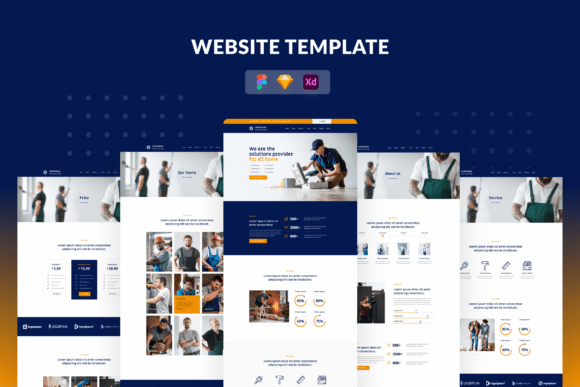
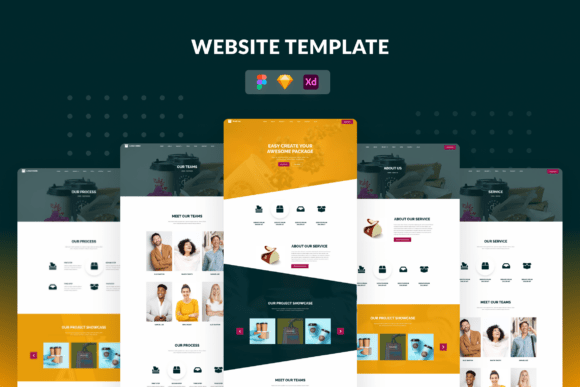
The Business Website Template is designed with a clean, modern aesthetic that works across industries. Built on a 1140px grid system, it ensures your site remains responsive and organized, no matter what content you add. With dimensions of 1920w × 8000h pixels and a resolution of 150 DPI, it supports high-quality visuals and smooth scrolling experiences.
One of the key advantages is its compatibility with popular design tools like Adobe Photoshop, Adobe XD, and Sketch. This means you can easily tweak layouts, colors, and elements without needing advanced coding knowledge. The use of Google Fonts and free icon fonts also ensures a professional look without licensing concerns.
When and Why You'd Use This Template
Imagine you're launching a new consulting business and need a website that clearly communicates your services, experience, and contact details. Instead of starting from scratch or using a generic theme, the Business Website Template gives you a polished structure that you can personalize quickly.
Or maybe you're a freelance designer looking to showcase your portfolio. The template includes dedicated sections for services, projects, and blog content—making it ideal for creatives who want to highlight their work and share insights.
For educators or trainers building a personal brand, the blog section can serve as a platform to publish articles, tutorials, or industry updates. It’s also a great fit for small businesses that need a professional-looking site without hiring a web developer.
Real-World Uses Across Different Industries
- Startups: Founders can use the template to create a company profile page, introduce their team, and explain their product or service offerings—all within a cohesive design.
- Marketing Agencies: Agencies can showcase case studies, client testimonials, and service packages using the portfolio and services pages.
- Freelancers: Photographers, writers, and designers can display their portfolios, share blog posts, and provide a clear way for clients to get in touch.
- Educators and Coaches: Those in the education or personal development space can use the blog and contact forms to engage with students or clients.
- Nonprofits and Organizations: Charities and community groups can build informative websites that explain their mission, share news, and encourage donations or volunteer sign-ups.
How Different Users Benefit
Each type of user gets something unique from the Business Website Template. For example, entrepreneurs may appreciate the ready-made homepage layout that highlights key offerings and calls to action. Bloggers might find the news section invaluable for publishing articles that are easy to read and navigate.
Designers and developers benefit from the smart layers and editable elements that make customization intuitive. Since the template is built with a consistent grid system, aligning content becomes much easier, reducing the time needed to finalize a site.
For those who aren't tech-savvy, the template offers a balance between flexibility and simplicity. You don’t need to write code from scratch, but you still have control over how your site looks and functions.
Things to Consider Before Using This Template
While the Business Website Template is versatile, it’s important to consider your specific needs before diving in. Ask yourself:
- Do I need a fully responsive design that works on mobile and desktop?
- Am I comfortable editing files in Photoshop, XD, or Sketch?
- Will I be updating content regularly, and does the blog layout support that?
- Do I have access to original images, or will I need to source new ones?
It's also worth noting that the template includes placeholder images for preview purposes only. When you're ready to launch your site, you’ll need to replace those with your own visuals or stock images that you have the rights to use.
Getting the Most Out of the Template
To make the most of this template, start by mapping out your website structure. Most users begin with the home, about us, services, blog, and contact pages included in the package. From there, you can add or remove sections based on your needs.
If you're targeting a specific audience, such as potential clients or customers, make sure your services page clearly outlines what you offer and how it benefits them. Use bullet points or short descriptions to keep the content scannable.
For the blog section, think about how often you plan to publish new content and what topics will provide the most value to your readers. A consistent posting schedule can help build trust and drive repeat traffic.
On the contact page, include multiple ways for people to reach you—whether it's through a contact form, email, phone number, or social media links. The more accessible you are, the more likely visitors are to engage.
Final Thoughts
The Business Website Template is more than just a design—it's a practical tool that helps professionals build a credible online presence efficiently. Whether you're a solo entrepreneur, part of a growing team, or a creative looking to share your work, this template provides a solid foundation that you can adapt to fit your goals.
By leveraging its features and focusing on real-world applications, you can create a website that not only looks great but also serves your audience effectively. And in today's digital landscape, that's exactly what you need to stand out and succeed.